
Key takeaways
- Descartes ForecastMine™ helps ecommerce businesses reduce manual work across inventory planning, product setup, and store replenishment.
- One supplier order form can be used to create product records, generate SKUs and barcodes, prepare Shopify draft listings, and produce a purchase order.
- Digby, ForecastMine’s artificial intelligence (AI) assistant, interprets supplier spreadsheets and helps establish reusable data mapping rules.
- Use everyday language to identify groups of products that need updated minimum and maximum stock levels.
- Your team can review supplier information, approve purchase orders (POs), and confirm replenishment changes before they are applied.
A new seasonal range arrives, and there’s plenty to do before the products are ready to sell. Supplier information needs to be checked, product records created, Shopify listings prepared, and POs approved. Meanwhile, stores still need replenishment, and stock settings from last season may no longer match what customers are buying. These jobs become more time-consuming as product ranges expand and store networks grow.
Descartes ForecastMine™ is an inventory forecasting and replenishment solution that helps ecommerce sellers manage inventory planning. Its AI assistant, Digby, also helps with two administrative tasks: processing supplier order forms and identifying products that need replenishment adjustments. Both workflows reduce the amount of manual data handling involved while allowing buyers and inventory planners to review important decisions.
Inventory forecasting is closely connected to wider warehouse operations, where solutions such as Descartes Peoplevox™, an ecommerce warehouse management system (WMS), support the processes involved in managing and fulfilling orders.
In this blog post, you’ll learn how ForecastMine helps you set up new product ranges faster, reduce repetitive data entry, and keep store replenishment levels aligned with demand so you can spend less time on inventory admin and reduce the risk of stockouts and excess stock.
Table of contents
Why inventory admin grows with your product range
Every new product range brings information that needs to reach multiple systems. Product records must be created, SKUs assigned, listings prepared, and POs built.
Supplier spreadsheets can make this surprisingly difficult. One supplier might list product sizes across columns, while another uses separate rows. Cost prices, descriptions, and other product details may also appear in different locations. Even when the required information is available, someone still must interpret the file and transfer the relevant details into the correct fields.
That creates opportunities for errors, particularly when the same information is copied into several systems. A cost price could be entered incorrectly, a product variant missed, or a SKU recorded inconsistently.
The workload doesn’t end once products are set up. Businesses with physical stores also need to maintain stock settings for each product at each location. A growing product range can turn what was once a manageable maintenance task into thousands of individual records to review.
ForecastMine addresses these two areas through AI-assisted supplier processing and group-based replenishment updates.
Turn one supplier form into product setup
Create the records you need from one upload
When a supplier sends an order form for a new range, ForecastMine can use the information in that file to support four tasks:
- Create product records for the new range.
- Generate SKUs and barcodes using the business’s existing numbering rules.
- Prepare draft product listings in Shopify with the relevant product information.
- Produce a purchase order ready for review and approval.
The supplier form only needs to be uploaded once for this workflow. This is particularly useful when launching seasonal collections with multiple product variants. Each size or colour may need its own SKU and product information, increasing the amount of data that would otherwise have to be entered manually.
Working from the same supplier file also reduces the need to transfer product details between separate spreadsheets and systems.
The process includes checks before the records are used. Shopify listings remain drafts, and POs are prepared for approval, giving staff an opportunity to verify the information.
Reuse supplier rules your team has reviewed
Supplier order forms don’t always follow the same structure, which has traditionally made product setup difficult to automate.
Digby helps interpret these differences. For example, a supplier might record product sizes in individual columns and place the cost price at the end of each row. Another could list each size separately, with costs appearing elsewhere in the spreadsheet. Staff can check whether the correct columns and values have been identified before confirming the mapping.
Once approved, those rules can be reused for future order forms from the same supplier. This means a familiar supplier layout doesn’t have to be mapped from scratch each time a new order arrives. The initial review establishes rules that can make subsequent product setup more consistent.
Book a demo to explore how ForecastMine can solve your inventory forecasting challenges.
Keep store replenishment settings current
Product setup is only one part of managing inventory. For businesses supplying several stores from a central warehouse, deciding how much stock each location should hold is another ongoing task.
While warehouse management solutions such as Peoplevox support the operational processes involved in managing stock within the warehouse, ForecastMine helps businesses plan stock requirements and replenishment.
Minimum and maximum stock levels help guide replenishment. A minimum level indicates when a product’s stock needs attention, while a maximum level provides a target or upper limit for replenishment. These settings help determine how much inventory should move from the warehouse to an individual store.
The number of settings can grow quickly. Consider a business carrying 2,000 products across 12 stores. That creates potentially 24,000 product-and-store combinations, each of which may need its own replenishment levels.
Those values also need to reflect local demand. One store might sell caps consistently while another sells more boots. Even stores carrying the same range may need different replenishment settings.
Seasonal demand adds another complication. Minimum and maximum levels established at the start of a range might no longer be suitable several months later.
If the settings aren’t reviewed, replenishment recommendations can become less useful. Some stores may run short of popular products while others continue receiving stock that sells slowly.
Find the group that needs attention
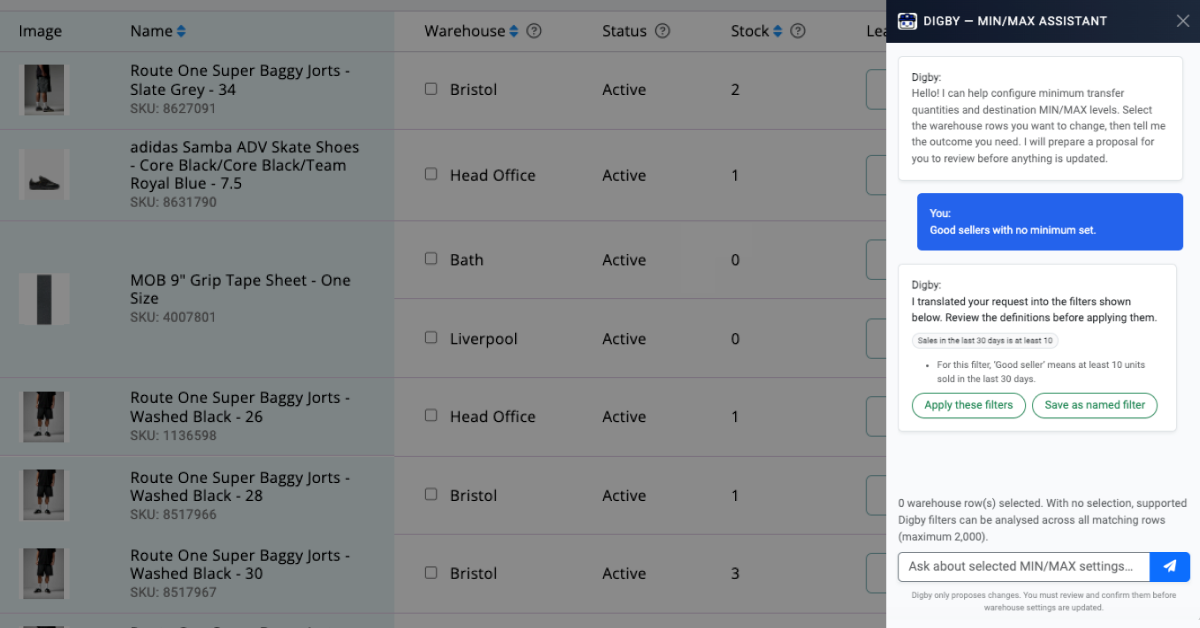
Digby allows inventory planners to identify groups of products using everyday language. Instead of working through a large spreadsheet or filtering individual product records, someone can enter a request such as:
- “Low stock caps in Bristol.”
- “Good sellers with no minimum set.”
Digby uses the request to find the relevant products for review. The same approach can be used to identify items across a collection, product category, or store location. For a business managing thousands of product-and-store combinations, this makes it easier to find the records that need attention.
For example, a planner reviewing a particular store could identify products that are selling well but don’t have a minimum stock level assigned. Those products can then be assessed together.
Review the group and apply the change
Once Digby has identified the relevant products, replenishment settings can be updated as a group. The workflow involves three steps:
- Check the selected products. Confirm that Digby has identified the intended group.
- Set the replenishment levels. Choose appropriate minimum and maximum stock values for the selected products.
- Confirm the updates. Review the changes before applying them.
This removes the need to open and edit each product-and-store record separately.
Importantly, Digby identifies the products, while the inventory planner decides which replenishment levels to apply. Those decisions can take into account store demand, available warehouse stock, and the business’s replenishment requirements.
Review replenishment levels as demand changes
Minimum and maximum stock settings need regular attention, especially for companies with seasonal collections or changing sales patterns. There are several points throughout the year when a review may be worthwhile:
- Seasonal launches. New collections arrive, and stores begin selling different product ranges.
- Changes in local demand. A product starts selling more quickly at one location than at others.
- Promotional activity. A campaign increases demand for a particular category.
- Established products. An item that previously sold slowly becomes a consistent seller.
With group updates, planners can review the affected products and adjust their settings without making hundreds of individual changes.
For example, if a promotion increases cap sales across several locations, the relevant products can be identified and their replenishment levels reviewed together. Locations with stronger demand may need different settings from stores where sales remain steady.
Keeping these values current can help warehouse-to-store transfer recommendations reflect how products are selling locally.
Updated settings won’t prevent every stockout. Unexpected demand, supplier shortages, and delivery delays can still affect product availability. However, regular reviews give businesses a better opportunity to identify outdated settings before they contribute to replenishment problems.
See how Descartes ForecastMine could help your business
Whether you’re preparing a seasonal range from supplier spreadsheets or managing replenishment across multiple stores, ForecastMine can reduce the manual work involved.
Book a personalized demo to see how Digby supports supplier order processing and replenishment updates within ForecastMine.
If you enjoyed this blog post on AI-powered inventory management and automation, you may also benefit from reading the following:
Descartes ForecastMine AI Inventory Automation FAQs
What does ForecastMine create when I upload a supplier order form?
ForecastMine can create product records, generate SKUs and barcodes using your numbering rules, prepare Shopify draft listings, and produce a purchase order for approval. The relevant information can be reviewed before the next steps are completed.
How does Digby handle different supplier spreadsheet formats?
Digby proposes how fields such as sizes, costs, and product details should be mapped. Once the mapping has been reviewed and confirmed, ForecastMine can reuse those rules for future order forms from the same supplier.
Can I control the inventory changes suggested by Digby?
Yes. Staff can review supplier field mappings, approve POs, and check product groups before confirming changes to minimum and maximum stock levels. Digby supports the process without independently determining the final replenishment settings.
Can I update replenishment levels for several products at once?
Yes. Digby can identify a group using a plain-language request, such as finding products in a particular category or store. You can then review the selected items and apply minimum and maximum stock levels to the group.
Will updated minimum and maximum stock levels prevent every stockout?
No. Keeping these settings current can improve replenishment recommendations, but unexpected demand, supplier shortages, and delivery delays can still affect availability. Regular reviews help keep replenishment planning aligned with store-level demand.